
Our Latest Articles
Choose Retrofit or Full Replacement for Electronic Locks in Ireland
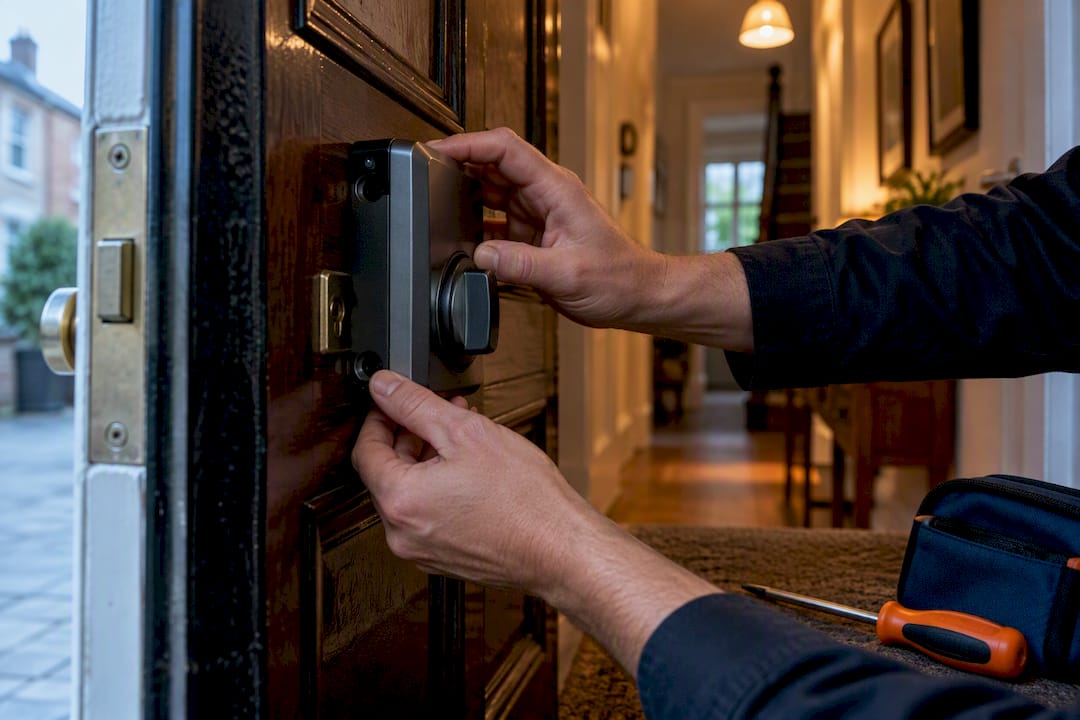
If your door is a standard deadbolt bore, a retrofit smart interior is usually the fastest, lowest-risk way to upgrade. If it’s a mortise door, a shared building entrance, or you need biometrics and centralised access control, a full replacement is the safer call. Either way, measure your door first, then book a short professional inspection if anything looks non-standard. Ecslocksmiths, along with any competent locksmith, can confirm compatibility before you spend a penny.
TL;DR:
- Retrofit smart locks are ideal for standard cylindrical deadbolts, quick to install, and suitable for tenants or those avoiding permanent modifications.
- Full replacement is necessary for mortise locks, multi-unit buildings, or if existing hardware is damaged or requires high-security features.
- Accurate measurements of backset, bore diameter, and door type are crucial, and professional inspection helps identify hidden issues like frame weaknesses or mortise conversions.
- Battery failures are the most common cause of lockouts, so regular checks, testing overrides, and firmware updates are vital to maintain reliability.
- A professional locksmith inspection before installation ensures compatibility, identifies hidden problems, and provides a clear recommendation, especially for complex or older doors.
Table of Contents
- Retrofit vs full replacement: which upgrade fits your door?
- How do you choose the right electronic lock for your door?
- Step-by-step: what an electronic lock upgrade actually involves
- What to check for door and hardware compatibility
- What are the real security benefits, and what can go wrong?
- What does an electronic lock upgrade cost, and how long does it take?
- How do you maintain an electronic lock and avoid lockouts?
- Why a professional inspection catches what a checklist can’t
- What most upgrade advice gets wrong
- Ready for a proper installation? Here’s the direct route
- Sources
- FAQ
Retrofit vs full replacement: which upgrade fits your door?
Most homeowners never need to touch their strike plate or door prep. A retrofit smart lock swaps out the interior mechanism, motorising the same deadbolt you already have, while keeping your existing exterior cylinder and keys working exactly as before. It’s the option that respects a period front door, a rental agreement that bans hardware changes, or simply a Saturday afternoon rather than a full day’s job.
A full replacement swaps the entire lock body, inside and out, for an integrated electronic unit. You lose the traditional exterior key entirely (though most models still ship with a physical override), and you gain far more control over access methods, credential limits, and how the lock talks to other security systems.
Retrofit makes sense when:
- Your door already has a standard cylindrical deadbolt with a normal backset.
- You want to keep the existing exterior look and hardware.
- You’re renting, or under a lease that restricts permanent alterations.
- You want the job done in under an hour with minimal disruption.
Full replacement makes sense when:
- Your door uses a mortise lock or Euro profile cylinder rather than a bored cylindrical deadbolt.
- You manage a multi-unit building and need centralised, keyed-alike or fully networked access.
- You want biometric entry, integration with a wider access control platform, or heavy-duty security ratings.
- The existing lock, frame, or strike plate is damaged and needs replacing anyway.
Real-world constraints often make the decision for you. Mortise doors typically can’t accept a standard consumer retrofit lock because the case and trim dimensions don’t match a bored deadbolt pocket. Landlords frequently restrict permanent modifications, which pushes tenants toward retrofit-only options. And anyone running keyed-alike systems across several doors will find retrofit kits awkward to scale, since each one still ties back to a separate mechanical core.
Retrofit is also the quicker fix when you’re simply not sure yet whether you want to commit to electronic access long-term. Installations can take as little as 30 minutes, which makes it a low-stakes way to trial the technology before investing in a full-property rollout.
How do you choose the right electronic lock for your door?
Once you know whether you’re retrofitting or replacing, the real decision is which features actually matter for how you’ll use the door.
Access methods
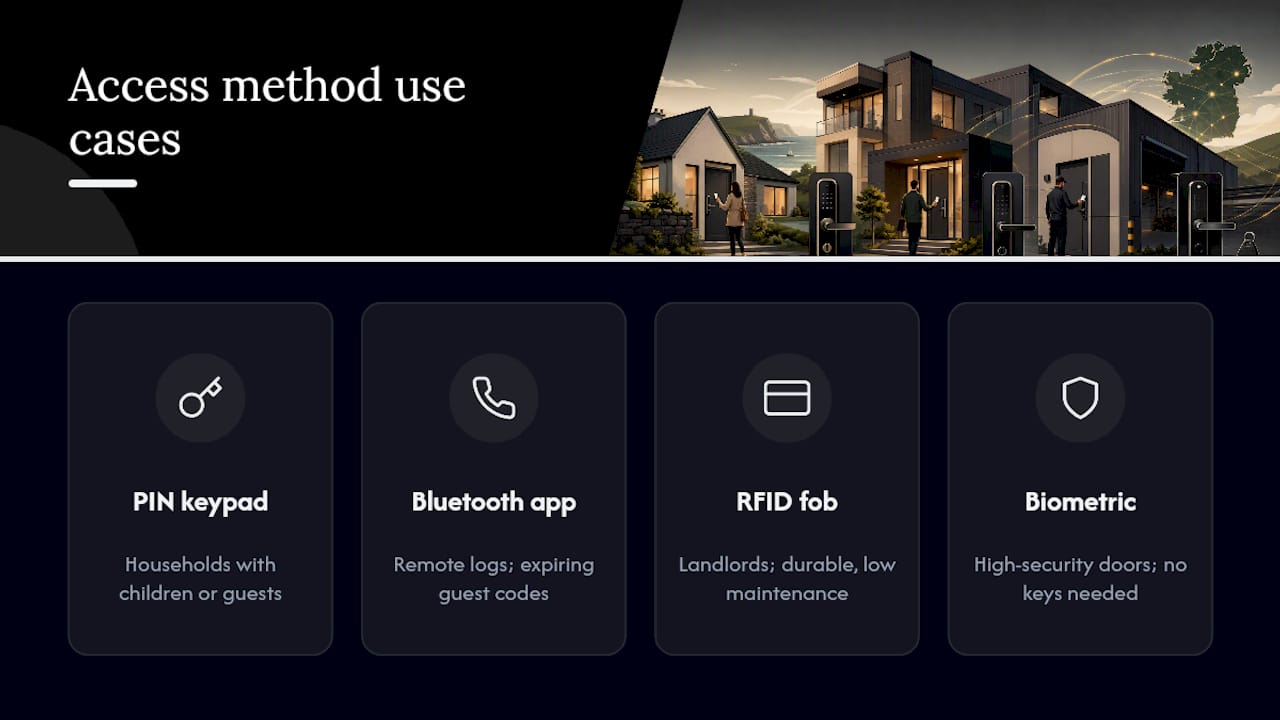
Electronic locks generally offer some combination of PIN keypad, smartphone app over Bluetooth, RFID fob or card, and biometric fingerprint entry. A PIN keypad suits households with children or guests who don’t want to fumble with an app. Bluetooth app control suits homeowners who want remote access logs and the ability to grant a cleaner or dog walker a code that expires automatically. RFID fobs suit landlords managing several tenants who need something durable and low-maintenance. Biometric readers suit high-security commercial doors or homeowners who simply hate carrying keys.
Connectivity and privacy trade-offs
Bluetooth-only locks are generally more private, since they don’t transmit anywhere beyond your phone in range, but you lose true remote access when you’re away from home. Wi-Fi-connected locks (often via a separate hub or bridge) let you lock and unlock from anywhere, check status remotely, and receive alerts, but they depend on a stable home network and introduce another device that needs firmware updates. Cloud-based systems store your access logs off-site, which is convenient for property managers juggling multiple properties, but it’s worth checking exactly how that data is encrypted and retained before you commit.
Feature checklist worth running through before you buy
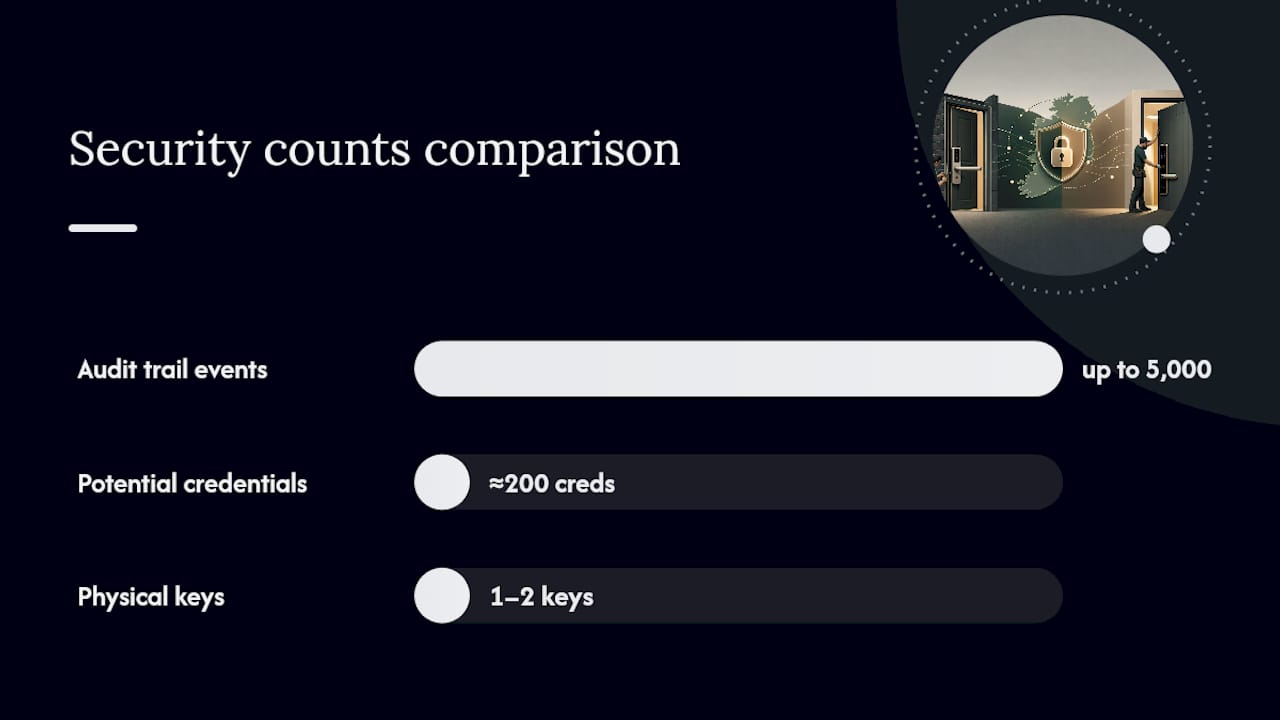
- Audit trail depth: some electromechanical deadbolts log up to 5,000 events, giving a genuinely useful record of who came and went and when.
- User credential limits: many models support up to 200 separate user codes or credentials, which matters if you’re managing a rental or shared building.
- Temporary and scheduled codes: useful for cleaners, tradespeople, or short-term guests without handing out a permanent key.
- Auto-lock delay: programmable windows, sometimes up to 900 seconds, that relock the door automatically if someone forgets.
- Physical key override: a mechanical backup that works even when the battery is flat or the electronics fail.
Compatibility checks before you commit to a model
Confirm the backset (the distance from the door edge to the centre of the bore hole), the bore hole diameter, the door thickness, and whether you’re dealing with a cylindrical deadbolt, a mortise lock, or a Euro profile cylinder. Heavy-duty platforms such as the Salto XS4 Original+ are built specifically for European mortise conversions, supporting door thicknesses from 32 to 120 mm and multiple credential formats including BLE, NFC, and RFID, which makes them a sensible pick for anyone retrofitting a mortise door rather than a standard deadbolt.
Pro Tip: Before buying anything, photograph your door edge with a tape measure in shot. Send that photo to a locksmith when you call for a quote. It saves a wasted trip and rules out the wrong lock before it’s even ordered.
DIY or call a professional?
If your door takes a standard cylindrical deadbolt and the new lock is explicitly listed as compatible with that bore size, DIY retrofit is usually straightforward with basic tools. If you’re dealing with a mortise door, a Euro cylinder, a fire door, or you’re simply not confident measuring accurately, book a professional. The cost of a wasted, non-returnable lock purchase usually outweighs a modest call-out fee.
Step-by-step: what an electronic lock upgrade actually involves
Whether you’re doing this yourself or briefing a locksmith, the sequence looks broadly the same. Knowing the steps helps you judge how long the job should realistically take, and spot when something’s gone wrong.
- Measure and record. Note the backset, bore hole diameter, door thickness, and lock type (cylindrical, mortise, or Euro profile) before you buy anything.
- Check the door swing and handing. Confirm whether the door is left or right handed and whether it opens inward or outward, since some electronic locks are handing-specific.
- Remove the existing hardware. For retrofit jobs, this means taking off the interior thumb-turn assembly only. For full replacement, both interior and exterior hardware come off.
- Fit the new mounting plate or chassis. This is where bore hole and backset accuracy matters most; a mismatch here is the most common reason DIY installs stall.
- Install the motorised mechanism and secure the mounting screws. Tighten evenly to avoid warping the latch alignment.
- Fit batteries and power on. Most residential units run on standard AA or AAA batteries; check the manufacturer’s minimum battery count before final assembly.
- Pair the lock. Connect via Bluetooth app, set the admin PIN, or register the first RFID credential depending on the model.
- Test the latch and strike plate alignment. The bolt should extend and retract smoothly without needing to lift or push the door.
- Add users and set schedules. Create guest codes, temporary access windows, or auto-lock delays as needed.
- Confirm the physical key override works, if the model includes one, before you consider the job finished.
Tools and parts commonly needed: a Phillips screwdriver, a tape measure, a pencil, sometimes a chisel for mortise conversions, the manufacturer’s template (usually included), and fresh batteries.
For a straightforward retrofit on a standard door, some keypad upgrades can be completed quickly by an experienced installer, though a first-time DIY attempt more realistically takes 30 minutes to an hour once you account for reading instructions and pairing the app. A full replacement, particularly on a mortise door, typically runs to one or two hours for a professional, and considerably longer for a first-time DIY attempt, given the extra chiselling and alignment work involved.
The most common day-of issue is a misaligned strike plate causing the bolt to bind. Locksmiths resolve this by re-chiselling or shimming the strike plate rather than forcing the mechanism, which protects the motor from premature wear. The second most common issue is a bore hole that’s fractionally undersized for the new hardware, which a professional can ream out cleanly rather than risk splitting the door face.
What to check for door and hardware compatibility
Get this wrong and you’ll be sending a lock back or paying twice for the callout. Four measurements and checks decide whether a given model will actually fit.
- Backset: the distance from the door edge to the centre of the bore hole, almost always 60 mm or 70 mm on standard doors, though older or non-standard doors can differ.
- Bore hole diameter: most residential locks are built for a standard bore, but older doors or non-standard hardware sometimes use a smaller or larger hole that needs adapters.
- Door thickness: typically 35 to 45 mm for interior doors and up to 50 mm or more for solid exterior doors; always confirm the manufacturer’s supported range.
- Lock type: cylindrical deadbolt, mortise lock, or Euro profile cylinder each require a different category of electronic hardware, and they are not interchangeable without a conversion kit.
Beyond the door itself, check the strike plate and frame. A worn or loose strike plate undermines even the best electronic lock, since the bolt won’t seat properly and auto-lock cycles will strain the motor. Reinforcing the frame at the same time as an upgrade is common practice, particularly on older timber doors where the original screws have loosened over decades of use.
Handing matters too: confirm whether the door is left or right-hung and which way it swings, since some electronic mechanisms are built for one orientation only.
Finally, check for red flags that have nothing to do with the lock’s dimensions. Fire doors often carry strict certification requirements that limit which hardware can legally be fitted, and altering them without checking first can void building compliance. Rented properties and apartment blocks frequently have lease clauses or management rules restricting permanent hardware changes, so it’s worth confirming with a landlord or building manager before ordering anything. Mortise pockets are a particular trap: a standard consumer deadbolt will not fit a mortise case no matter how carefully it’s measured, because the case and trim sizes are built to entirely different standards.
What are the real security benefits, and what can go wrong?
Electronic locks solve a specific problem mechanical locks never could: knowing exactly who came and went, and when. That’s the single biggest upgrade in practical terms, not the novelty of unlocking a door with a phone.
The genuine benefits:
- Audit trails. Some advanced models log up to 5,000 access events, giving landlords and property managers a real record rather than a guess.
- Instant revocation. Lose a key and you have to rekey the whole lock. Lose a phone or fob and you delete the credential in seconds.
- Scheduled and temporary codes. Grant a cleaner access from 10am to 2pm on Tuesdays, and the code simply stops working outside that window.
- Auto-lock reduces human error. Experts point to auto-locking as one of the most concrete benefits of electronic locks over mechanical ones, because forgetting to lock a door is a far more common security failure than any lock being picked.
The genuine downsides:
- Battery failure risk. A dead battery locks people out just as effectively as a broken mechanical latch, sometimes more so if there’s no working override.
- Connectivity vulnerabilities. Wi-Fi bridges and cloud accounts add an attack surface that a purely mechanical lock never had.
- Poor credential hygiene. Shared PINs that never get rotated or old tenant codes left active undermine the entire audit trail benefit.
Statistic worth sitting with: some electromechanical deadbolts, such as the DOREX F500, support many separate user credentials with BLE pairing secured by 128-bit encryption. That’s a meaningful jump from the one or two physical keys most households manage today, but it also means 200 potential points where a credential can be mishandled if nobody’s managing the list.
Mitigations are straightforward and worth building into your routine from day one: always confirm a physical key override exists and works before relying on the lock day-to-day, keep firmware updated on any Wi-Fi-connected model, use a secured (not open or default-password) home network for any bridge device, and treat shared PINs the same way you’d treat a shared password, changing them when anyone with access leaves. A professional installer will typically test the override, confirm firmware is current at handover, and check that default admin credentials have been changed before calling the job complete.
What does an electronic lock upgrade cost, and how long does it take?
Product prices vary mainly by feature set rather than brand prestige. Basic keypad retrofit locks sit at the entry end, while heavy-duty mortise-compatible platforms with multiple credential formats and higher security ratings cost considerably more. The main price drivers are the number of supported credentials, whether the lock includes app and cloud connectivity versus Bluetooth-only, and whether it’s rated for commercial or multi-unit durability.
- Product cost bands: entry-level keypad retrofit locks are the cheapest option; mid-range app-connected deadbolts sit above that; heavy-duty mortise or Euro profile platforms designed for commercial or multi-unit use command the highest prices.
- Labour and call-out fees: a standard installation call-out is priced differently from an emergency lockout, so always ask whether you’re booking a scheduled visit or an urgent same-day callout before assuming a quote applies.
- Time estimates: a single retrofit door typically takes under an hour for a professional; a full mortise replacement can run to one or two hours; multi-unit rollouts across a building are usually staggered over several visits rather than done in a single day, both for cost management and to avoid locking out every resident at once.
- Hidden or recurring costs: some systems require a separate hub for remote connectivity, others charge an ongoing subscription for cloud-based audit logs, and lost RFID cards or fobs usually need replacing individually rather than being reissued for free.
Staggering a multi-unit rollout also gives a property manager the chance to fix teething issues, a stiff strike plate here, a firmware quirk there, on one door before rolling the same fix out across the rest of the building.
How do you maintain an electronic lock and avoid lockouts?
Most electronic lock failures trace back to one thing: a battery nobody was watching.
Check batteries roughly every six months as a baseline, though the real signal to watch is your lock’s own low-battery warning, whether that’s an app alert, a flashing LED, or an audible chirp on the keypad. Many consumer retrofit locks depend on both a physical key override and proactive battery monitoring, and skipping either one is how people end up locked out on their own doorstep.
Before you consider an installation finished, confirm the physical key override actually works, not just that the lock has one listed in its specifications. Test it once with the door open, so you’re not discovering a faulty override during an actual lockout.
Pro Tip: Set a recurring calendar reminder for battery checks rather than relying on memory. A five-minute check twice a year is far cheaper than an emergency locksmith call-out at 11pm.
Simple troubleshooting steps before calling anyone:
- Replace batteries first, even if the indicator looks fine; a false low reading is common.
- Check the app or hub is connected to Wi-Fi if the lock has stopped responding remotely.
- Try the physical key override to rule out a purely mechanical jam versus an electronic fault.
- Restart the lock via its manufacturer-recommended reset procedure if the keypad has become unresponsive.
If none of that resolves it, Ecslocksmiths’s aftercare guidance covers more detail on common faults. When you do call a locksmith, have the make and model to hand, the approximate age of the batteries, and a description of exactly what happens when you try to unlock it. That single detail often cuts diagnosis time in half.
Why a professional inspection catches what a checklist can’t
A measuring tape tells you the backset and bore diameter. It won’t tell you that the strike plate is cracked behind the frame, or that what looks like a standard deadbolt pocket is actually a disguised mortise conversion from a previous renovation. That’s the gap a professional inspection closes.
Ecslocksmiths positions itself around fast, reliable, and affordable locksmith services covering residential, commercial, and automotive security needs, with 24/7 availability, customer satisfaction guarantees, and free estimates before any work begins. For an upgrade decision specifically, that means a technician arrives, checks the door type, backset, and frame condition in person, and gives you a straight answer on retrofit versus replacement before you’ve spent anything on hardware.
What a proper inspection checks that a self-measured checklist typically misses:
- Frame strength and hidden reinforcement, since a frame that’s been shimmed or patched over the years may not hold a heavier electronic mechanism securely.
- Hidden mortise variants, where a door looks like a standard bored deadbolt from the front but conceals an older mortise case behind the trim.
- Strike plate wear invisible from a quick glance, which becomes a real problem once auto-lock cycles start putting repeated stress on a misaligned bolt.
- Handing and swing issues that only become obvious once someone’s actually opening and closing the door under real conditions, not just measuring it static.
Booking that kind of visit through Ecslocksmiths costs nothing upfront under the free estimate offer, which makes it a low-risk way to settle the retrofit-or-replace question before committing to a specific model.
What most upgrade advice gets wrong
The internet’s default advice on electronic locks treats every door like it’s the same generic deadbolt bore, and that’s where most DIY attempts go wrong. The measurement step gets skipped, or done with a phone camera rather than an actual tape measure, and the lock arrives fitting nothing.
The bigger blind spot, though, is battery discipline. Reviews obsess over app features and biometric options, but the single most common failure mode reported across retrofit installs is a flat battery with no working override tested beforehand. That’s not a hardware flaw. It’s a setup mistake, and it’s entirely avoidable.
My honest read: retrofit is the right default for the vast majority of standard front doors, and the industry’s enthusiasm for full smart-home integration often oversells complexity most households don’t need. Prioritise getting the measurements right, confirm the override works before you rely on it, and only escalate to a full replacement when the door itself, not the feature list, demands it.
— Barry
Ready for a proper installation? Here’s the direct route
Retrofit kits and DIY guides get most standard doors sorted, but mortise conversions, damaged frames, and multi-unit rollouts are exactly where a wrong guess gets expensive. A technician inspects your door, tells you plainly whether retrofit or full replacement fits, and quotes it before any work starts, with no cost for the estimate itself.
A typical visit covers the same compatibility checks this article has walked through: backset, bore diameter, door thickness, lock type, and frame condition, plus a straight recommendation on hardware. The service covers residential, commercial, and automotive locksmith work, including electronic and high-security lock installation, with 24/7 availability for anyone who’d rather not gamble on a Saturday DIY attempt going wrong.
To get started, request a free estimate through Ecslocksmiths and have your door type and rough measurements ready when you call. If you’re mid-project and something’s already gone sideways, whether that’s a stuck strike plate or a lock that won’t pair, the main Ecslocksmiths site has contact details for same-day callouts.
Sources
Several of the figures and compatibility rules in this guide come directly from manufacturer specification sheets and independent technical explainers, worth bookmarking if you’re comparing specific models:
- iLOQ — Electronic lock (marketing/insights page)
- PCWorld — Buying a smart lock: Retrofit your old one or replace it?
FAQ
Can I convert any lock to a smart lock?
Not always. Standard cylindrical deadbolts convert easily with retrofit kits, but mortise locks and Euro profile cylinders typically need a dedicated electronic mortise lockset or smart cylinder rather than a standard consumer retrofit. Measuring your backset, bore diameter, and lock type first tells you which category you’re dealing with.
Can I install a digital lock in an existing door?
Yes, in most cases, provided the door has a standard bored deadbolt and the new lock’s specifications match your backset and bore diameter. Retrofit installations on compatible doors can take as little as 30 minutes, while mortise doors generally need professional conversion or a full replacement.
Are electronic locks worth it?
For most households, yes, the audit trail, instant revocation, and auto-lock features solve real problems mechanical locks can’t. The value is clearest for rentals, shared buildings, or anyone who’s ever had to rekey a whole property after losing a key.
What are the downsides of digital door locks?
The main risks are battery failure causing lockouts, connectivity vulnerabilities on Wi-Fi-connected models, and poor credential hygiene such as shared codes that never get updated. All three are manageable: confirm a working physical key override exists, keep firmware updated, and treat access codes the way you’d treat a shared password.
When should I call a locksmith instead of doing it myself?
Call a professional if your door is a mortise or Euro profile type, if the frame or strike plate shows visible wear, or if you’re simply unsure about the measurements. Ecslocksmiths offers free estimates specifically to settle that question before you buy hardware.
What services do locksmiths in Ireland actually offer?
It’s more than just unlocking doors. Most locksmiths provide:
Emergency lockouts (home, car, business)
Lock repairs and replacements
Key cutting and rekeying
Security upgrades (e.g. anti-snap locks)
Car key replacement
How quickly can you respond to an emergency?
In emergency situations, typical arrival times should be at your location within 20-30 minutes. There are always professional locksmiths on standby, ready to handle any lockout or security emergency, ensuring safety is never compromised.
Can a lockmsith help with high-security locks and systems?
Absolutely! Most locksmiths specialise in advanced high-security lock systems, including electronic locks, biometric security, smart locks, and keyless entry systems. The should be trained in the latest security technologies, ensuring that they can provide the highest level of protection for your home, office, or vehicle. Ask for a free expert consultation to help you choose the right security system for your needs.
Will a locksmith provide a warranty on there services?
Yes, all locksmiths should stand by the quality of there work and offer a 100% satisfaction guarantee. Most would by default offer a warranty on all services, ensuring that you receive the best craftsmanship and long-lasting results.
Can a locksmith open Cars
Yes, most locksmiths are trained to open cars.
How quickly can a locksmith get to me in an emergency?
Most locksmiths in Ireland offer 24/7 emergency callouts and typically arrive within 15–60 minutes, depending on your location and traffic. In Dublin, response times can be as fast as 10–30 minutes, especially for emergency lockouts.
Can a locksmith open my door without damaging it?
Yes A professional locksmiths use non-destructive entry methods first. Drilling is usually a last resort, not the default approach.
If someone immediately suggests drilling without inspecting the lock, that’s a red flag.
How much does a locksmith cost?
Costs vary depending on the service, time of day, and complexity of the job. A standard lockout is usually cheaper than replacing a lock. Emergency or late-night services may cost more.
Prices vary, but here’s a realistic guide:
Standard callout/labour: €85–€95
Lockout service: from ~€85–€120+
Lock replacement: depends on parts + labour
Important: Always ask for a full quote upfront and if there is a call out fee. Some companies advertise low prices but increase costs after arriving.
Prices can vary quite a bit… call around for quotes!
Can you make a key without the original?
Yes A professional locksmiths use non-destructive methods whenever possible. Damage usually only happens if the lock is faulty, high-security, or has already been tampered with.
Do locksmiths in Ireland need to be licensed?
Yes. In Ireland, all locksmiths must be licensed by the Private Security Authority (PSA).
If you’re hiring someone:
Ask for their PSA licence number
Avoid anyone who can’t prove credentials
By asking for the licence you avoid the scammers.
Providing Locksmith Services For More Than 30 Years in Dublin, lock outs, lock fitting, slam locks, car opening, commerical and domestic.


Quick Links
Home
About Us
Services
Testimonial
Faqs
Legal
Privacy Policy
Terms & Conditions